Add Yahoo! Messenger to Blog
Do you know what is
Yahoo! messenger? I sure you is surely knew it.
Yahoo! messenger is one of yahoo.
com service very popular
in the world. Then what his relation with
blog? some blogger wish to be in his blog attached yahoo !
messenger icon , hence if him online in yahoo!
messenger can in knowing by his blog visitor and also can easy to in contacting for chatting. If you ask to me, can yahoo! messenger icon add at blog? the answer is can,
and not only that, we can choose icon what is will add. The choice is differentiated in 10 choice, you remain to choose style ID which which is compatible according to your :
This is the style ID of yahoo! messenger icon :
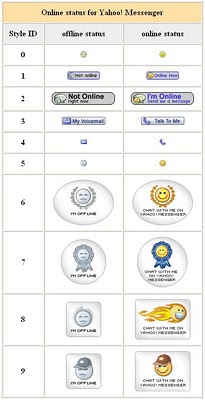
Allright, to placed the yahoo! messenger icon just place this code at your sidebar :
YOURID">![]() YourID&m=g&t=StyleID" border="0">
YourID&m=g&t=StyleID" border="0">
For example. If your yahoo ID is balakasadut24@yahoo.com, your ID is balakasadut24, So the code for yahoo! messenger icon with choice Style ID 9 is as follows :
balakasadut24">![]() balakasadut24&m=g&t=9" border="0">
balakasadut24&m=g&t=9" border="0"> Now, how to place the code to your blog. Follow the teps :
- Login to blogger with your ID.
- After entering the dasboard page , click Layout. Please saw the picture :

- Click at Page Element tab. See the picture below :

- Click at Add a Page element.
- After emerging pop up window , click add to blog button for the things HTML/JavaScript. See the picture following :

- Copy and paste the code below into available column :
- Change YOURID with your yahoo ID and StyleID with number of your choice.
- Click

- Finish. Please see the result.


