Nomba Muda Blog

Wish it goes like a nothing to something..

Mengubah Document Root pada Localhost

Kali ini ane ingin berbagi pengetahuan neh tentang localhost. Bagi para master mah ini udah bukan hal asing lagi kali yah..hehehe . Tapi gpp, ilmu untuk semua umur dan kalangan kan?

Yaudah, klo gitu langsung ajah dah..
Biasanya kan, tempat kita menyimpan file² yang ingin ditampilkan di Localhost itu kan di drive C tuh. Pertanyaannya bisa ngga seh klo kita simpan di drive lain? Drive D atau di Flashdisk kita? Jawabannya tentu saja bisa. Mari kita tengok dulu file yang menentukan default ‘document root’-nya, biasanya seh namanya ‘httpd.conf’. Dibawah ini contoh file httpd.conf pada XAMPP (hanya sebagian saja) :    

Nah, dari situ ajah udah kelihatan tuh configurasi yang menentukan document root-nya (lihat pada baris 176 dan 203). Singkatnya gini :

Kita bisa mengubah setelan tersebut dengan cara:
-Buka C:/xampp/apache/conf
-Klik 2x file yang bernama httpd.conf dan buka dengan menggunakan editor semisal notepad.
-Cari kata-kata DocumentRoot "C:/apache/htdocs"
Ganti C:/apache/htdocs dengan drive yang kamu inginkan. Misal "D:" atau "E:"
-Cari kata-kata Directory "C:/apache/htdocs"

Ganti C:/apache/htdocs dengan drive yang kamu inginkan. Misal "D:" atau "E:"
-Simpan

Langkah selanjutnya:
Restart xampp
Caranya:
Buka C:/xampp
Klik icon stop
Tunggu hingga proses selesai
Kemudian klik icon start.
Atau bisa juga dengan Restart Komputer kamu.

Buka browser kamu, lalu ketik 'localhost' atau '127.0.0.1'
Maka, localhost kamu akan menampilkan isi drive D:
 
phpMyAdmin
Nah, masalahnya bagaimana kalau mengakses phpMyAdmin? Kalau kita baru saja mengedit file httpd.conf-nya, ketika kita mengakses phpMyAdmin, pasti ngga muncul? Mengapa demikian? Karena tidak terdapat pada document root-nya. So gimana dunk? Gampang ajah, tinggal kamu copy folder phpMyAdmin yang ada pada dirve C ke document root sesuai configurasi kita masing-masing.

Selamat mencoba teman-teman.
Terima Kasih.

Banyak sekali yang tanya tentang setting modem dengan kartu three. Kayaknya three banyak pemakainya juga gan, selain murah untuk daerah Jakarta dan Surabaya three sudah memiliki jaringan HSDPA, semoga bisa disusul juga didaerah lain.
Kali ini aku akan postkan tentang modem ZTE 626 (lumayan murah ni modem soalnya )
Aku coba instal di windows 7 Starter, yang sebelumnya sudah terinstal driver modem Huawei E1550 (kalau yg blm pernah diinstal driver modem/ aplikasi modem usb, ya silahkan lewati tahapan nomer 1).


  1. Pertama hapus / uninstall dulu driver modem yang lain kalau ada kalau belum langsung langkah 2 (soalnya di komputerku yang sebelumnya sudah driver modem Huawei E1550, maka saat install driver modem ZTE 626 ini enga bisa)
  2. Install driver modem ZTE 626 yang sudah tersedia paketnya di dalam memori modem. Jadi colokkan saja modemnya dan klik 2X file instalasinya.
  3.  Ikuti proses instalasinya hingga selesai, dan klik 2x icon modem pada desktop, hingga tampil seperti berikut:
  4. Setelah selesai lakukan setting modem untuk kartu 3 (three) seperti ini  dengan syarat kartu three kamu sudah didaftarkan untuk paket internet (infonya silahkan baca disini :
  5. selanjutnya:
    • Klik Setting
    • Klik Connections kemudian klik Add (untuk menambahkan operator baru)
    • Klik Tab Common kemudian isikan yang berikut :
      Config name = Three
      Dial number = *99#
      Klik Use the following APN address dan isikan 3data
      User name = 3data
      Password = 3data
      Klik Save
    • Sekarang klik Tab Advance yang ada disebelah tab Common kemudian klik CHAP pada Authentication mode (biarkan yang lain jangan dirubah) Terakhir klik Save
    • Sekarang kembali ke Menu Connection dan pilih Three kemudian klik Apply
    • Sekarang tutup editor setting ini dan kembali ke tampilan awal modem jika berhasil maka akan ada tanda sinyal
    • KlikCobalah klik Connect yang bergambar orang
  6. Semoga membantu……..

Left 4 Dead 2 Cheats

For Single Player:
While inside the single player game, open your "~" console:

type "sv_pure 1"

then? "map [map name]"

now the game should had exited itself automatically,

type in "map [map name]" again, the game will enter into that map,

finally, type "sv_cheats 1"

enjoy the game with all cheats enabled ;-)

Please kindly rate "Thumbs-Up" if it helped, thanks in advance~


Entry Location:
Select Options > Keyboard/Mouse. Enable Allow Developers Console. Press '~' to activate the console.

tongue_range <#> - (Default 750) Sets the maximum range of the smoker's tongue attack
z_pounce_damage X - amount of damage you want to do to survivors
z_witch_burn_time - Amount of time before a burning Witch dies from fire (does not effect caused by fire)
z_health - Change zombie health
z_speed - Change Zombie speed
director_no_human_zombies 0/1 - Disables/enables controllable Boss Infected on any map
director_panic_forever 0/1 - Enables/Disables never ending panics
director_force_panic - Forces a panic event
give ammo - Full Ammunition
give pistol - Get pistol
impulse 101 - Give Ammo to your primary weapon
give autoshotgun - Give auto shotgun
give first_aid_kit - give first aid kit
give health - give full health
give gascan - give gascan
give hunting_rifle - give hunting rifle
give molotov - give molotov
give oxygentank - give oxygentank
give_pain_pills - give pain pills
give pipe_bomb - give pipe bomb
give propanetank - give propanetank
give rifle - give you an MK 47 ( machine gun )
z_spawn weapon_SMG - give you the SMG
god - invincibility
buddha 1 - just like god but you receive damage (sometimes if you are the only survivor left, you can't receive damage from infected
sb_openfire or open_fire (console will tell) - makes your bot teammates shoot nonstop
director_no_mobs <1/0> - No mob rushes
firstperson - Play in first person (default), this cheat only necessary if thirdperson mode is enabled
Ent_Remove - Removes all bots
z_witch_damage <#> - Sets the amount of damage a Witch's attack does
thirdperson_mayamode - sets the camera to be fixed in place whle in either third person or third person shoulder mode. Enter once to turn on and enter again to turn off
thirdperson - sets the camera to be in third person mode
thirdpersonshoulder - sets the camera to over the shoulder third person mode
z_common_limit - sets the maximum amount of regular zombies
z_tank_health <#> - sets the maximum health of the tank
z_frustration_lifetime <#> - sets the number of seconds until the player loses control of the tank from not attacking survivors
sb_friendlyfire <1/0> - sets whether or not bots (and only bots) are allowed to do friendly fire damage
director_stop - Shuts off all wanderers, mobs, specials, and bosses
z_spawn zombie - spawn 1 zombie
boom - spawn a active pipebomb under you
z_spawn - spawn a special infected
z_spawn mob - spawn a zombie horde
z_spawn boomer - spawn boomer at location of crosshair
z_spawn hunter - spawn hunter at location of crosshair
z_spawn smoker - spawn smoker at location of crosshair
z_spawn tank - spawn tank at location of crosshair
noclip - Toggles no clipping mode
z_witch_allow_change_victim <1/0> - True/false setting that allows the witch to change targets instead or focus on the one survivor that alerted her first
sv_infinite_ammo 1 - unlimited ammunition

Entry Location:
Steam/:Properties

Open steam. Go to my games. Click the Left 4 dead 2 icon once, and then press *Properties* next to *Launch*. Then open: Set launch options; and simply type in: -console. When you open the game next time the editors/cheat console will be open.(NOTE: The console will disappear until you re-start the game unless you bind a key to it)(OBSERVE: punctuation such as : , ; . _ or * shall not be typed into the *set launch options* console)

Submitted By: theblueguy2


Left 4 Dead 2 Unlockables

Steam Achievments
A ride denied - Kill a jockey within 2 seconds of it jumping on a survivor.
A spittle help from my friends - As the spitter, spit on a survivor being choked by a smoker.
Acid reflex - Kill a spitter before she is able to spit.
Armory of one - Deploy an ammo upgrade and have your team use it.
Back in the saddle - As the jockey, ride the survivors twice in a single life.
Beat the rush - In a survival round, get a medal only using melee weapons.
Bridge burner - Survive the parish campaign.
Bridge over trebled slaughter - Cross the bridge finale in less than three minutes.
Burning sensation - Ignite 50 common infected with incendiary ammo.
Cache and carry - Collect 15 gas cans in a single scavenge round.
Chain of command - Kill 100 common infected with the chainsaw.
Cl0wnd - Honk the noses of 10 clowns.
Club dead - Use every melee weapon to kill common infected.
Confederacy of crunches - Finish a campaign using only melee weapons.
Crass menagerie - Kill one of each uncommon infected.
Dead in the water - Kill 10 swampy mudmen while they are in the water.
Dismemberment plan - Kill 15 infected with a single grenade launcher blast.
Fried piper - Using a molotov, burn a clown leading at least 10 common infected.
Fuel crisis - Make a survivor drop a gas can during overtime.
Gas guzzler - Collect 100 gas cans in scavenge.
Gas shortage - Cause 25 gas can drops as a special infected.
Gong show - Prove you are stronger than moustachio.
Great expectorations - As the spitter, hit every survivor with a single acid patch.
Guardin' gnome - Rescue gnome chompski from the carnival.
Head honcho - Decapitate 200 infected with a melee weapon.
Heartwarmer - In a versus round, leave the saferoom to defibrillate a dead teammate.
Hunting party - Win a game of scavenge.
Level a charge - Kill a charger with a melee weapon while they are charging.
Long distance carrier - As the charger, grab a survivor and carry them over 80 feet.
Meat tenderizer - As the charger, grab a survivor and smash them into the ground for a solid 15 seconds.
Midnight rider - Survive the dark carnival campaign.
Price chopper - Survive the dead center campaign.
Qualified ride - As the jockey, ride a survivor for more than 12 seconds.
Ragin' cajun - Survive the swamp fever campaign.
Robbed zombie - Collect 10 vials of boomer vomit from infected ceda agents you have killed.
Rode hard, put away wet - As the jockey, ride a survivor and steer them into a spitter's acid patch.
Scattering ram - As the charger, bowl through the entire enemy team in a single charge.
Scavenge hunt - Stop the enemy team from collecting any gas cans during a scavenge round.
Septic tank - Use a bile bomb on a tank.
Shock jock - Revive 10 dead survivors with the defibrillator.
Sob story - Navigate the sugar mill and reach the safe room without killing any witches.
Stache whacker - Prove you are faster than moustachio.
Still something to prove - Survive all campaigns on expert.
Strength in numbers - Form a team and beat an enemy team in 4V4 versus or scavenge.
Tank burger - Kill a tank with melee weapons.
The quick and the dead - Revive 10 incapacitated survivors while under the speed-boosting effects of adrenaline.
The real deal - Survive a campaign on expert skill with realism mode enabled.
Violence in silence - Navigate the impound lot and reach the cemetary safe room without tripping any alarms.
Weatherman - Survive the hard rain campaign.
Wing and a prayer - Defend yourself at the crashed airliner without taking damage.


Left 4 Dead 2 Hints

Gnome Chomsky
Entry Location:
Dark Carnival

In the second chapter of the Dark Carnival campaign you will find a shooting range. Play this game until you score 750 points and you will receive Gnome Chomsky. Have one survivor escape the rest of the campaign with him to unlock the Achievement.

Submitted By: Cody G.


Left 4 Dead 2 Glitches

Going for gold over a Wall

Entry Location:
Most Survival maps

Get 1 guy with a nade launcher to crouch down next to a wall with level ground on the other side, and have another guy jump off something onto the head of the crouched nader. While the jumper is in mid air fire the nade. time it right and the jumper will be sent flying into the air, if controlled correctly the jumper can land just on the other side of a wall and be defibbed. The jumper should then run to the far side of the map, and the rest of the team can start the match. The jumper being so far away from the spawns should receive little attention from hordes. Go for the Gold. Example location: Parish, bridge..... On the Highway facing the Bridge there is a fence. Have 1 guy jump off from the green canopy. Good luck.

Submitted By: old school


Get on top of a sign
Entry Location:
Second part of the Parish campaign

Once you are off the boat head up the ramp and you'll see a barricade with barbed-wire at the top. Jump up on top of that and you'll see a gib sign right behind you. Face away from the sign looking down at the water, jump forward just a little bit and it will force you to hang from the sign instead of the barricade over top of the water. Someone will help you up and you will be on top of the sign.

Submitted By: thebull27


Sumber gamesradar.com 


Terinspirasi oleh film Disney Mobil 2: videogame ini memungkinkan pemain untuk terjun ke dunia film dengan beberapa selebriti favorit Anda di lokasi eksotis di seluruh dunia. Bermain sebagai Mater, Lightning McQueen dan karakter lain. Fungsi baru seperti pemain pelatihan untuk menjadi mata-mata di dunia-kelas internasional pusat pelatihan -
CHROME (HQ Komando Operasi dan Spionase Recon Bermotor). Bermain di misi berbahaya, kontes untuk menjadi pembalap tercepat di dunia atau menggunakan keahlian Anda dalam spionase balap memerangi menarik, penuh aksi arena pertempuran. Pemain dapat bersaing dengan teman-teman dan keluarga di mode tunggal atau multiplayer sampai dengan empat pemain untuk membuka trek baru yang menantang, karakter, kejadian dan misi spionase mendebarkan.

Nama: 2 Mobil: The Video Game
Produsen: Software Longsor
Gaya: Ras
Sistem Operasi: Win XP | Vista | Tujuh
Tanggal Rilis: 2011
Ukuran: 1,6 GB
Format:. Rar
Kualitas grafis: 10
Gameplay Level: 10
Jumlah Media: 1 DVD5
Bahasa: Inggris / Rusia
CRACK: Include
Download Cars 2 The Game Disini ..
http://downloadtube.co.tv/?p=3595


Kebetulan ane cari Plant Vs Zombie yang kedua, karena sudah selesai main plszombies yang pertama.


Tak disangka ketemu pls zombie the story,
ane download dan mainkan, ternyata ini buatan orang indonesia sendiri..
pertama main sih gampang...lama-lama susah deh lawan bos zombie...
ini permainannya gratis dan keluaran tahun 2011,
link downloadnya ; Klik Disini.

ini screenshotnya;


Selamat Bermain. ^^


Benda asing yg diperkirakan meteor jatuh, terlihat di langit ciledug sekitar pukul 17.30 WIB waktu setempat.
Sebelumnya saya mengira bahwa ini adalah pesawat jatuh, tapi setelah saya amati dengan seksama, jelas ini bukanlah pesawat karena panjang ekor api terlalu panjang jika memang berasal dari api ledakan pesawat, dan juga inti benda yg terbakar juga terlalu kecil jika disebut sebagai pesawat, namun sampai saat ini masih belum ada penjelasan resmi dari pemerintah mengenai hal ini.

Add Yahoo! Messenger to Blog

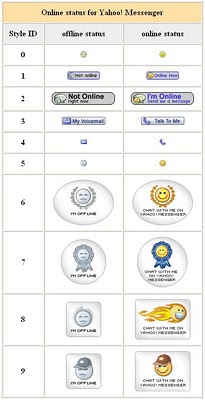
Do you know what is Yahoo! messenger? I sure you is surely knew it. Yahoo! messenger is one of yahoo.com service very popular in the world. Then what his relation with blog? some blogger wish to be in his blog attached yahoo ! messenger icon , hence if him online in yahoo! messenger can in knowing by his blog visitor and also can easy to in contacting for chatting. If you ask to me, can yahoo! messenger icon add at blog? the answer is can, and not only that, we can choose icon what is will add. The choice is differentiated in 10 choice, you remain to choose style ID which which is compatible according to your :

This is the style ID of yahoo! messenger icon :

YM icon
Allright, to placed the yahoo! messenger icon just place this code at your sidebar :

YOURID">YourID&m=g&t=StyleID" border="0">
For example. If your yahoo ID is balakasadut24@yahoo.com, your ID is balakasadut24, So the code for yahoo! messenger icon with choice Style ID 9 is as follows :
balakasadut24">balakasadut24&m=g&t=9" border="0"> Now, how to place the code to your blog. Follow the teps :
  1. Login to blogger with your ID.
  2. After entering the dasboard page , click Layout. Please saw the picture :
  3. layout
  4. Click at Page Element tab. See the picture below :
  5. page element
  6. Click at Add a Page element.
  7. After emerging pop up window , click add to blog button for the things HTML/JavaScript. See the picture following :
  8. javascript
  9. Copy and paste the code below into available column :
  10. Change YOURID with your yahoo ID and StyleID with number of your choice.
  11. Click  save changes   
  12. Finish. Please see the result.

Symantec ativirus merupakan antivirus yg lengkap dengan fitur - fitur yang pastinya dibutuhkan untuk pengamanan komputer dari seluruh serangan virus, spyware, dan spam.
Fitur - fitur utama tersebut meliputi :

  • live update ( dengan satu kali klik maka antivirus akan terupdate otomatis )
  • full system & drives scan ( scan seluruh system dan drive )
  • quick scan ( scan seluruh system dengan cepat )
  • file system auto protect ( melindungi komputer dari segala ancaman virus, spyware, dan spam dengan otomatis )
  • internet e-mail auto protect ( spam blocker )
  • lotus notes auto protect
  • microsoft exchange auto protect
  • temper protection
  • schedule scan ( anda dapat mengatur waktu scan dan update antivirus )
  • dll
Untuk download anda dapat klik disini .
Terima kasih. ^^

INI DIA WINPAD 7 PEMBUNUH IPAD (KEREN BANGET GAN!!!)

Mo eksis dengan pad? duit pas-pasan? nggk usah cemas deh... daripada beli IPAD yang harganya nggk ketulungan, bagus beli WINPAD 7 neh... pic :


Sepeknya neh :

- Intel® Atom® N450 NM10 1.66GHz
- OS Windows 7 Ultimate
- CAPACITIVE Multi Touch Screen
- Memory: 1GB DDR2, support up to 2GB
- Video Card: Intergrated, Intel GMA 3150
- Video Memory: 128MB
- Monitor: 10.2 Inch TFT LCD+Touchscreen,1024*600
- Sound Card: Realtek HDA Integrated
- Camera: High definition 1,3 Mpix
- Hard Disk: 160G SATA interface 2.5
- Wireless Network: 802.11a/b/g Wi-Fi
- Support external 3G: WCDMATD-SCDMACDMA2000
- Ethernet: 10100 Base-TX Ethernet
- Battery: Lithium Polvmer Battery (3000mah)
- HDMI to VGA port
- 3 in 1 card reader

Kisaran harga : 3,5-3,7jt lah..... gimana ok kan???? ( yg bikin postingan mahh teeteep aja ga bsa bli >,<' ) IPAD will be die lahh.....

Trus apa aja software yg jalan di winpad ne...????
Semua software PC BISA diinstal di sini (OFFICE, PHOTOSHOP, CORELDRAW, WINAMP, ALL BROWSER, GAMES)

Trus bisa disambung ama USB DEVICES : KEYBOARD, MOUSE, MODEM, JOYSTICK, DLL... KEREN KHAN????

note: yg bikin postingan mahh teeteep aja ga bsa bli >,<'

Sejak kemarin malam saya banyak menghabiskan waktu saya dengan mengutak-atik tampilan desktop komputer saya yang bersistem operasi Windows XP Home Edition (OEM) agar terlihat menjadi seperti tampilan sistem operasi terbaru dari Microsoft yaitu Windows 7.

Saya telah mencoba beberapa themes gratisan, mendownload beberapa icon pack, wallpaper, dan lain sebagainya untuk diaplikasikan di sistem operasiWindows XP Home Edition (OEM) komputer saya tersebut agar tampilannya mendekati tampilan Windows 7. Namun akhirnya pilihan saya jatuh kepada sebuah aplikasi buatan NiwradSoft bernama Seven Remix XP dimana kebetulan versi aplikasi yang saya download adalah Seven Remix XP 2.0 yang memiliki ukuran file sebesar 18.36 MB dan bisa kalian download secara gratis disini
Cara menginstall aplikasi Seven Remix XP ini sangat gampang, ya.. karena ekstension filenya adalah EXE jadi kita tinggal double-click saja file yang telah kita download tadi dan tunggu hingga proses instalasinya selesai lalu kemudian kita reboot komputer kita. Aplikasi ini selain merubah tampilan desktop seperti wallpaper, icon, dan taskbar, juga merubah tampilan screen pada saat booting, logon, file suara, dan lain sebagainya.

Lucky 77-3 box List

Lucky 77-3 box is going to be released in Chapter 3. So take a look what are the goodies inside =). The percentages may subject to changes depending on the dev.

==== GEMSTONES (GETTING THESE MEANS YOU FAILED THE ROULETTE XD) ====

Ruby x35 [3.42%]
Emerald x35 [3.42%]
Opal x35 [3.42%]
Aquamarine x35 [3.42%]
Sapphire x35 [3.42%]
Orichalcum x20 [2.85%]
Moonstone x20 [2.85%]
Litheon x20 [2.85%]
Wind Crystal x20 [2.85%]
Fairy's Wings x20 [2.85%]
Heart Stone x20 [2.85%]
Manastone x20 [2.85%]
Stone of Life x20 [2.85%]
Mind Stone x20 [2.85%]

==== ONE-HANDED SWORDS ====

Crystal Sword [1.77%]
Level 41
Physical Attack 57
Magic Attack 18
Strength +10
Dexterity +15
HP +350

Bloody Scimitar [1.18%] (Int warrior?)
Level 62
Physical Attack 88
Magic Attack 85
Strength +5
Dexterity +5
Vitality +5
Intelligence +15
Wisdom +5
MP +300

Lenciana's Rapier [0.47%]
Level 83
Physical Attack 126
Magic Attack 36
Strength +23
Strike +10
HP Recovery +5

==== ONE-HANDED AXES ====

Halberd [1.22%]
Level 61
Physical Attack 88
Magic Attack 26
Vitality +5
Critical Rate +172
Strike +5

Partisan [0.66%]
Level 102
Physical Attack 169
Magic Attack 46
Strength +14
Critical Damage +2%
Accuracy +7

==== ONE-HANDED MACES ====

Regulus's Wooden Club [1.22%]
Level 61
Physical Attack 88
Magic Attack 26
Vitality +11
Wisdom +15
Move Speed +52

Athena's Mithril Hammer [0.66%]
Level 82
Physical Attack 126
Magic Attack 118
Intelligence +19
Magic Attack +5%
MP Recovery +5

==== ONE-HANDED WANDS ====

The Shining Stone [1.77%]
Level 41
Physical Attack 28
Magic Attack 58
Wisdom +24
Life +410
MP Recovery +11

Crystal Orb [1.18%]
Level 62
Physical Attack 43
Magic Attack 85
Vitality +15
Wisdom +25
Magic Defense +5%

Power of Lotus [0.47%]
Level 83
Physical Attack 59
Magic Attack 118
HP +350
[Reckless Mind] Skill Level +1
Can only casted on mob.

==== TWO-HANDED SWORDS ====

Deadly War Sword [0.36%]
Level 41
Physical Attack 84
Magic Attack 40
Strength +22
Dexterity -19
[Berserker] Skill Level +1

==== TWO-HANDED AXES ====

Decapitator [1.77%]
Level 41
Physical Attack 84
Magic Attack 24
Strength +12
Strike -5
Critical Rate +94

Ancient Ax [0.24%]
Level 62
Physical Attack 128
Magic Attack 38
Strength +24
Dexterity -14
Critical Damage +4%

Kimball's battle Axe [0.61%]
Level 83
Physical Attack 182
Magic Attack 51
Strength +19
Strike -9
Critical Rate +133

==== TWO-HANDED MACES ====

Grand Sceptor [1.22%]
Level 61
Physical Attack 116
Magic Attack 35
Strength +10
Vitality +15
HP Recovery +7

Mighty Sceptor [0.66%]
Level 102
Physical Attack 228
Magic Attack 61
Strength +20
Vitality +20
MP +129

==== TWO-HANDED STAVES ====

Merlin's Short Staff [1.77%]
Level 41
Physical Attack 42
Magic Attack 65
Intelligence +19
HP -150

Circe's Quarter Staff [0.24%]
Level 62
Physical Attack 62
Magic Attack 94
Intelligence +23
Evade -10
Move speed -95

Alberig's Elder Staff [0.08%]
Level 83
Physical Attack 85
Magic Attack 126
Magic Attack +5%
Life -666 (what, lol)
[Magic Attack +5%] Skill Level +1

Antares's Power [0.02%]
Level 104
Physical Attack 111
Magic Attack 163
Intelligence +14
Physical Defense -5%
[Reckless Mind] Skill Level +1

==== DAGGERS ====

Cinquedea [1.77%]
Level 41
Physical Attack 44
Magic Attack 18
Strength +9
Critical Rate +82
Evade +13

Deadly Bone Knife [1.18%]
Level 62
Physical Attack 66
Magic Attack 26
Strength +13
Critical Damage +2%
Life -109

Take That, Dude! [0.61%] (Seriously, it should be "dood". Go play some Disgaea XD)
Level 83
Physical Attack 92
Magic Attack 36
Strength +22
Accuracy +13
Critical Damage +7%

==== BOWS ====

Aktaeon's Long Bow [0.36%]
Level 41
Physical Attack 92
Magic Attack 24
Dexterity +9
HP -150
[Ice Rain] Skill Level +1

Orion the Hunter [0.24%]
Level 62
Physical Attack 143
Magic Attack 38
Strength +10
Dexterity +15
MP +98
[Quick Move] Skill Level +1

Altair's Composite Bow [0.13%]
Level 83
Physical Attack 204
Magic Attack 51
Evade -19
[Fast Reload] Skill Level +1
[Whispering Fire] Skill Level +1

==== HELMETS ====

Helm of Helios [1.57%]
Level 21
Defense 7
Strength +11
Move Speed +64
HP -175

Magic Helm of Pluto [0.23%]
Level 62
Defense 22
Strength +2
Dexterity +2
Vitality +2
Intelligence +2
Wisdom +2
[Blood Oath] Skill Level +1


==== SHIELD ====
Arkas's Wooden Shield [1.77%]
Level 41
Defense 38
Vitality +10
MP +300
Move Speed -90

Aeneas's Tower Shield [0.24%]
Level 62
Defense 61
Magic Defence +30
Strength +10
Vitality +15

==== RINGS ====

Orion's Ring [1.97%]
Level 21
Magic Defense 8
Dexterity +7
HP +94
MP +20

Aldebaran's Energy [1.13%]
Level 62
Magic Defense 18
Strength +5
Dexterity +9
MP +110

The Will of Hercules [0.06%]
Level 103
Magic Defense 41
Strength +5
Dexterity +5
Vitality +5
Intelligence +5
Wisdom +5

==== EARRINGS ====

Spica's Prophecy [1.71%]
Level 41
Magic Defense 11
Intelligence +8
HP +64

Castor's Earrings [0.10%]
Level 82
Magic Defense 22
Intelligence +5
HP -215
[Set:]
Gemini Earring
[Bonuses: 2 Items]
Magic Attack +5%
Evade +19
Move Speed -88

Gemini Earring [0.59%]
Level 82
Magic Defense 22
Intelligence +5
HP -215
[Set:]
Castor's Earrings
[Bonuses: 2 Items]
Magic Attack +5%
Evade +19
Move Speed -88

==== NECKLACES ====

Ganymede's Song [1.77%]
Level 21
Magic Defense 18
Strength +2
Dexterity +2
Vitality +2
Intelligence +2
Wisdom +2
HP +42
MP Recovery +3

Hercules Band [0.23%] (How exactly is he associated with 666?)
Level 62
Magic Defense 58
Strength +5
Physical Attack +5%
HP Recovery -666

Regulus's Pendant [0.12%] (Harry Potter Reference?)
Level 83
Magic Defense 80
Dexterity +10
Critical Damage +7%

Zeus' Pearl Necklace [0.02%]
Level 104
Magic Defense 102
MP Recovery +5
[Every Ability Point 2% Increase] Skill Level +1

==== BELTS ====

Ron Kay's Belt [1.69%]
Level 21
Defense 5
Magic Defense 3
Strength +5
Intelligence +5
MP +50

Eros's Accessory [1.47%]
Level 62
Defense 7
Magic Defense 12
Physical Attack +1%
Evade +5
MP Recovery +3

==== CLOAKS ====

Phixus Cloak [1.05%]
Level 65
Move Speed +150
Physical Attack +1%

Cloak of Hellenpolis [1.05%]
Level 65
Move Speed +150
Magic Attack +1%

==== HEAD DECORATION ====
(Slot for Almighty Worm, Unicorn Horn, etc.)
(Note: All head decors are timed at 365 days)

You're a Sweet [0.05%]
Level 80
[Max HP 5% Increase] Skill Level +1
[Attack with Spinning Hook] Skill Level +1


You're Kind [1.05%]
Level 80
Physical Attack +1%
Strike +14
Move Speed +65

You're Sleek [1.05%]
Level 80
Vitality -15
[Dagger Mastery] Skill Level +1

You're Haemaleun [1.05%]
Level 80
MP +275
[Bow Range +1m] Skill Level +1

You're Fierce [1.05%]
Level 80
Evade -10
[Witch Mastery] Skill Level +1


You're Quiet [1.05%]
Level 80
[Group Heal] Skill Level +1
[Great Heal] Skill Level +1
[Transfer Mana] Skill Level +1

==== CONSUMABLES ====

Map Transfer Scroll (3 Days) [1.69%]
Premium Hair Style Shop Coupon [0.05%]
Movement Speed Increase [20%] Potion (3 Days) [1.78%]
Warehouse Recall Order (3 Days) [2.23%]
Enchant Scroll: Weapon 1-39 [1.32%]
Enchant Scroll: Weapon 40-79 [2.30%]
Enchant Scroll: Weapon 80-119 [1.88%]
Enchant Scroll: Armor 1-39 [0.73%]
Enchant Scroll: Armor 40-79 [0.89%]
Enchant Scroll: Armor 80-119 [1.04%]
Enchant Scroll: Accessory 1-39 [1.32%]
Enchant Scroll: Accessory 40-79 [1.65%]
Enchant Scroll: Accessory 80-119 [1.81%]


Pernah ga kepikiran untuk cari uang yang mudah di internet dan ga perlu ribet - ribet bikin website yang wah supaya ada perusahaan iklan yang mau pasang iklannya di website anda ??


Nah gimana klo anda coba tips saya yang berikut ini : 


1.      Pertama – tama buat blognya atau websitenya dulu yang mau di tampilin iklan, misalnya di blogger.com. Saya skip untuk pembuatan blognya ya, semua pasti sudah tau kan, mudah ko.. ^^


2.      Setelah blog anda jadi maka lahkah kedua adalah member template yang menarik, ini penting karena pewarnaan iklan nanti di sesuaikan dengan warna – warna yang ada pada template di blog anda, untuk template kita dapat mendownload di, zoomtemplate.com, blogtemplate4u.com, btemplates.com. Pilih dan download template yang anda inginkan, sebagai contoh saya memilih template Night Sky di btemplates.com.


3.      Setelah di download maka file hasil download menggunakan format .zip, maka extract terlebih dahulu maka akan tampil isi dari folder zip tersebut.


4.      Lalu buka halaman deisign di blogger anda dan klik Edit HTML, maka akan ada menu Backup/ Restore Template dan ada tombol Browse untuk mengapload template baru untuk blogger anda, maka klik tombol browse pilih folder extract-kan dari Night-Sky.zip yang tadi kita download, buka foldernya dan pilih Night-Sky. Klik Open maka proses upload akan berlangsung, jika sudah maka klik save template, maka blog anda akan mengunakan template night sky.


5.      Sekarang saatnya menampilkan iklan pada blog anda, ketikkan http://adsensecamp.com. Lalu klik tombol Create Publisher Account, dan isi Formulir registrasinya lalu Submit. Jika sukses maka anda akan di kirimkan email yang berisi link untuk menkonfirmasi akun anda di adsensecamp.com, maka klik link tersebut dan anda akan masuk ke profil anda di adsensecamp.com.


6.      Jika sudah pertama yang harus di lakukan adalah ubah data bank anda, klik Account> Ubah Data Bank, maka akan tampil Pilih Jenis Bank, ini menanyakan bank apa yang anda gunakan, lalu isi formulir email account, yang diisi dengan nomor rekening bank anda, nama account yang diisi dengan atas nama siapa nomor rekening yang anda masukkan, minimum transfer diisi dengan jumlah uang yang akan masuk ke nomor rekening anda jika sudah mencapai total berapa. Jika sudah lalu Save.


7.      Selanjutnya kli Publisher> Pasang script iklan lalu sesuaikan warna dan ukuran serta bentuk dari iklan yang akan tampil di blog anda, jika sudah maka klik Pilih Tampilan Iklan Ini, maka akan tampil script HTML untuk di copy di blog anda.


8.      Buka blog anda lalu masuk ke design> page element lalu klik add gadget> HTML/ Java Script lalu paste, jangan beri judul pada gadget ini. Jika anda tadi memilih tampilan iklan yang vertical maka tempatkan HTML ini di bagian samping blog anda  lalu save.


9.      Sekarang blog anda sudah memiliki iklan, untuk melihatnya dapat dengan menkli tombol View Blog.

Originally Posted by tanjungcity
Nanya donk !
Asli super bingung guide" fighter smuanya menjanjikan ....
Dari mulai Destroyer , Knight , Swordmaster , dll ...
Bingung msti milih jade paan ya ?
Wa mo nanya neeh kira" dari fighter tipe apa yang paling bagus ? Pas lvling n huntting .... Gx ribet" amat lawan momon... pokonya yg easy going bray

Mohon pencerahanya ...

Kelebihan tiap" job fighter

Job 1
Fighter
- Karakter jarak dekat standart
- Bisa menggunakan senjata 1 handed dan 2 handed
- Punya buff utk STR


Job 2
Guard
- Hanya menggunakan senjata 1 handed + shield
- Punya buff utk Def
- Punya skill pasif regen HP
- Ada kemampuan heavy armor expertise (5)
- Punya 1 skill AOE (area of effect)


Warrior
- Hanya menggunakan senjata 2 handed
- Punya buff utk Atk dan STR
- Punya skill pasif Increase ATK
- Tidak Ada kemampuan heavy armor expertise
- Punya 1 skill AOE


Job 3
Swordman
- Bisa menggunakan senjata 1 handed dan 2 handed
- Hanya bisa menggunakan sword
- Punya buff utk MP
- Punya skill pasif regen MP
- Punya skill self heal
- Punya skill sleep
- Punya skill jarak jauh
- Tidak Ada kemampuan heavy armor expertise
- Punya 3 skill AOE


Mercenary (Human)
- Hanya menggunakan senjata 2 handed
- Punya buff utk ATK dan STR
- Punya skill pasif Increase ATK
- Tidak Ada kemampuan heavy armor expertise
- Punya skill area debuff utk decrease Def
- Punya 3 skill AOE


Infantryman
- Hanya menggunakan senjata 1 handed + shield
- Punya buff utk Def dan shield block
- Punya skill pasif Regen Hp
- Punya skill AOE Taunt (kaya provoke di RO cmn area)
- Punya skill stun
- Punya skill meningkatkan drastis Def dan MDef dalam waktu singkat
- Punya skill heal (sedikit namun cepat)
- Ada kemampuan heavy armor expertise (10)
- Hanya ada 2 skill AOE


Job 4
Phalanx
- Hanya menggunakan senjata 1 handed + shield
- Punya buff utk Def dan shield block
- Punya skill pasif Regen Hp
- Punya skill AOE Taunt (kaya provoke di RO cmn area)
- Punya skill stun
- Punya skill meningkatkan drastis Def dan MDef dalam waktu singkat
- Punya skill invisible dalam waktu singkat
- Punya skill heal (sedikit namun cepat)
- Ada kemampuan heavy armor expertise (20)
- Punya 3 skill AOE

Knight
- Hanya menggunakan senjata 1 handed + shield
- Punya buff utk Def dan shield block
- Punya skill pasif Regen Hp
- Punya skill AOE Taunt (kaya provoke di RO cmn area)
- Punya skill stun
- Punya skill Meningkatkan drastis Regen HP dalam waktu singkat
- Punya Buff Unik (+Atk, + Movespeed, + ASPD)
- Ada kemampuan heavy armor expertise (15)
- Ada 3 skill AOE


Gladiator (Human)
- Hanya menggunakan senjata 2 handed
- Punya buff utk ATK dan STR
- Punya skill pasif Increase ATK
- Punya buff utk ASPD dan Crit
- Tidak Ada kemampuan heavy armor expertise
- Punya skill area debuff utk decrease Def
- Punya 3 skill AOE


Rune Knight (Elf)
- Bisa menggunakan senjata 1 handed dan 2 handed
- Hanya bisa menggunakan sword
- Punya Buff utk Mp
- Punya skill pasif regen MP
- Punya self heal
- Punya skill sleep
- Punya skill jarak jauh
- Punya skill stun jarak jauh
- Punya skill Debuff AOE (- Atk - Matk)
- Punya skill aura
- Tidak ada kemampuan heavy armor expertise
- Ada 3 skill AOE

E-mail 1 : nombamuda@gmail.com
E-mail 2 : muda_neh@yahoo.co.id
Handphone : +6285716956677

Canaan Online Indonesia

canaan online hadir di indonesiaKemeriahan HUT RI tahun ini semakin meriah dengan hadirnya game teranyar dari Prodigy Infinitech. Canaan Online Indonesia sebagai 1st Free web Based Flash MMORPG akan mewarnai semarak merah putih dunia game Indonesia dengan membuka masa Close Beta Testing pada tanggal 17 Agustus 2010 pk.12:00 WIB.


Kalian hanya perlu menggunakan browser untuk masuk ke www.canaan.web.id lalu registrasikan Account dan langsung mainkan ^o^
Sistem Auto Combat dan Auto Navigation mempermudah kalian bermain, dan tidak hanya itu..Masih banyak system lainnya seperti Collection System, Equipment System, Instance System, dan yang menjadi fitur utama di Canaan Online Indonesia adalah Pet System. Tangkap, pelihara dan latih Genius Pet mu untuk menaklukkan Tanah Canaan. Pet ini nantinya akan menemani kamu untuk bertarung untuk mendapatkan point Experience, ataupun menambah status Atributmu.

Pet ini juga dapat diatur letak penempatannya pada saat battle ( Formation ), bisa berada di depan Character Player maupun dibelakangnya, sehingga dapat membantu Character kamu dalam hunting maupun untuk PK.
Sistem Levelling yang digunakan di Canaan Online Indonesia menggunakan system penambahan atribut jika kamu berhasil naik level. Atribut-atribut yang digunakan adalah STR ( Strength ), CON (Constitution), DEX(Dexterity), SPR( Spirit ), INT ( Intelligence ).

Terdapat juga system On & Offline Training, dimana fitur ini merupakan fitur baru yang berbeda dari jenis game lainnya. Yang dimaksud dengan system ini adalah :

- Online Training adalah fitur dimana player dapat tetap menaikan level karakter dan juga level pet meski tidak dimainkan, tetapi tidak dapat melakukan hal lain selama Online Training.

- Offline Training adalah fitur dimana player dapat tetap menaikan level karakter dan juga level pet meski dalam status offline. Dan masih banyak Fitur-fitur menarik lainnya.

Bergabunglah juga di Canaan Online Community Forum http://forum.canaan.web.id untuk mencari informasi menarik tentang Canaan Online ataupun berkenalan dengan member lainnya untuk bertukar informasi yang berguna untukmu.

Dan jangan lupa add Fan Page Canaan Online Indonesia di http://www.facebook.com/canaan.online dan Twitter kami di http://www.twitter.com/canaanindo.
Segera bergabung bersama seluruh Friends of Canaan dan mainkan gamenya!

1. tuliskan langkah-langkah install Joomla offline (dr extrack file joomla s/d hapus folder installation)
Pertama extract file joomla dari joomla.rar di drive E:
Jika sudah di ekstract maka buka MySQl Front buka localhost dan buat database baru dengan cara klik menu Database>New>Database dan buat database baru, contoh buat dengan nama joomla dan klik ok lalu minimize MySQl anda.
Jika sudah maka buka browser internet anda, contoh mozilla firefox lalu pada address bar ketik localhost maka akan tampil isi dari darive E:, dan buka folder extract-kan dari joomla.rar tadi maka halaman awal dari joomla web intaller akan muncul.
Maka akan tampil Halaman pemilihan bahasa yang digunakan, dan kita pilih English karena bahasa Indonesia tidak ada.
Lalu akan tampil Pre-installation Check disini akan menampilkan informasi kebutuhan system yang diperlukan untuk penginstallan joomla, jika sudah memadai maka akan tampil yes pada semua tab spesifikasinya dan klik next.
Lalu akan tampil licence aggrement setuju saja dan lalu klik next.
Dan akan tampil Database Configuration pada tab basic setting pilih MySQL untuk database type, localhost pada host name, praktek pada user name, dan isikan password sesuai dengan yang anda inginkan contoh mahasiswa, lalu nama database yang telah anda buat tadi, contoh joomla tadi pada database name lalu next.
Maka akan tampil FTP Configuration dan langsung klik next.
Lalu akan tampil Main Configuration dan isikan site namenya, contoh Gado – gado Online, Lalu isikan E-mail anda, dan masukkan admin password, contoh admin dan isikan yang sama pada confirm admin password, jika anda ingin memasukkan sampledata pada web anda maka klik Install Sample data dan klik next.
Maka installasi selesai dan akan tampil Finish pada layar dan klik tombol admin dan masukkan username admin dan password anda tadi maka halaman awal dari web joomla anda akan tampil.
Lalu hapus folder installation pada drive E: tempat kita mengektrak joomla.rar tadi dan intallasi selesai.

2. jelaskan fungsi dari :
• Artikel Manager Tempat untuk menagtur keseluruhan dari aktifitas artikel termasuk menambah baru, edit, dan menghapus artikel – artikel yang anda buat pada web joomla anda.
• Front Page Manager : Tempat untuk menagtur keseluruhan dari aktifitas semua item yang ada pada halaman utama web joomla anda termasuk menambah baru, edit, dan menghapus sesuatu yang ada pada halaman utama web joomla anda.
• Category manager : Tempat untuk menagtur keseluruhan dari aktifitas kategori yang ada termasuk menambah baru, edit, dan menghapus semua kategori yang ada pada web joomla anda.
• Section Manager : Menu yang memungkinkan anda menambah atau mengedit section ( bagian ) .
• Media Manager : Menu yang memungkinkan anda untuk menambah apapun ke dalam web joomla anda dan anda juga dapat menghapus serta mengeditnya.
• Menu Manager : Tempat untuk mengatur seluruh menu yang ada pada web joomla anda dan juga memungkinkan anda untuk menambah serta mengapus, serta mengeditnya.
• Language manager : Tempat untuk anda memilih bahasa yang anda gunakan pada web joomla anda.
• User manager : Menu untuk menampilkan user yang sedang aktif mengakses web joomla anda.
• Global Configuration : Tempat untuk mengatur settingan dasar dar web joomla anda .

Jawaban tugas wordpress 09/02/2010

Nomba Muda – 0911511509

1. Buat database pada MySQL-Front dari Start>MySQL-Front, Maka akan akan tampil menu open session lalu pilih root, maka akan tampil seperti berikut :

Lalu klik Database>New>Database dan buat database dengan nim anda (contoh: 0911511509)

Dan minimize window MySQL-Front


.

2. Setelah itu buka ftp://192.168.100.7/Dosen/humisar/Rekayasa%20Web/ pada Run, lalu copy file wordpress-2.6.zip dan paste pada drive E: (contoh).

Lalu extract file wordpress-2.6.zip maka akan tampil isi dari file wordpress-2.6.zip yaitu folder bernama Wordpress.

Setelah itu buka Browser anda contoh Mozzila Firefox dan pada address isi dengan localhost lalu akan tampil seperti pada gambar berikut :


Lalu cari file database yang tadi di buat di MySQL-Front, contoh tadi adalah 0911511509, jika ada maka database yang tadi dibuat akan dapat dipakai untuk pembuatan wordpress.

Lalu Buka Folder Wordpress yang ada pada localhost maka akan tampil seperti ini :


Jika sudah tampil seperti ini maka kita sudah memulai pembuatan wordpress offline, dan kita mulai dengan mengklik Create a Configuration File.

Maka akan tampil :


Lalu klik Let’s go!

Dan akan tampil Wordpress Stup Configuration yang berisi seperti ini :


Dan isi Database Name, contoh : 0911511509, User Name : root, Password : , Database Host : localhost, Table Prefix : wp_

Maka akan tampil Run The Istall, dan klik.


Maka akan tampil :


Isi Blog Title, contoh : Nomba Muda – 0911511509, dan e-mail : nombamuda@gmail.com.

Lalu klik Install Wordpress maka akan tampil User name dan Password yang harus anda ingat untuk masuk ke blog yang tadi kita buat.


Lalu Log In.

Dan masukkan user name dan password yang telah diberikan sebelumnya.


Dan anda akan masuk ke halaman utama wordpress yang tadi telah kita buat.


Dan Installasi wordpress pun selesai.

3. Langkah – langkah installasi template baru adalah sebagai berikut :

Buka menu Design>Theme.

Untuk menambah template baru kita hanya perlu mendownload template dan menaruh folder tersebut pada folder wordpress\wp-content\themes, dan secara otomatis akan tampil pada menu Theme, seperti pada gambar berikut :


4. Cara membuat plug-in dan aktifkan.

Buka menu plug-in pada dashboard dan klik lalu pilih plug-in uyang diinginkan contoh Hello Dolly dengan cara ceklist pada menu hello dolly lalu activate.

Maka pug-in tadi akan aktif dan akan tampil tulisan Pugin activate.

5. Klik menu design>widget lalu pilih categories dan klik add.


Maka akan tampil :


Contoh menambah kategori tugas dan klik save changes.

6. Membuat postingan baru dengan cara klik menu write, lalu isi postingan dan klik publish.


7. Membuat page baru dengan cara klik menu design>widgets lalu pilih page>add.

Maka akan tampil :


Lalu isi dan save changes.

8. Untuk mengatur tata letak widget adlah dengan mendrag and drop menu widget tersebut, dan untuk merubah pengaturannya dengan menklik menu edit.

9. Fungsi template adalah memperindah tampilan dari blog yang kita punya sedangkan plugin adalah untuk pelengkap blog yang kita miliki.

10. Perbedaaan postingan dan page adalah jika postingan langsung dapat di tampilkan isinya sedangkan page tidak.


Invasion of the Giant Squids

by Mike Krumboltz


5 hours ago

2,991 Votes

Giant squids! Sorry to startle you, but we're just so excited. You see, they're giant squids! And they're invading California beaches by the hundreds! And in a heavily attended press conference this morning, they announced plans to star in their own reality show!

OK, so maybe that last one hasn't happened (yet), but the rest of it is the honest-to-god truth. An article from the AP explains that the squids weigh up to 60 pounds each, but most tip the scales somewhere between 20 and 40 pounds. And, yes, they squirt ink when irritated.

Web searches on the giant squids (GIANT SQUIDS!) are already off the charts. One-day spikes on both "giant squids" and "giant squids in california" surged from near-zip into the thousands. Folks clearly want to see these gargantuan creatures for themselves.

Despite their intimidating heft and tendency to spew ink, the squids aren't scaring off local fishermen. As of today, around 400 of the giant squids have been nabbed by anglers. That number is likely to rise. An article from San Diego 6 explains that locals "started booking twilight fishing trips over the weekend to catch them."

The last time the giant (aka “jumbo” aka “Humboldt”) squid made waves in Search came last September, when a record-breaking 19 ½-foot-long, 103-lb beast was pulled from the Gulf of Mexico.

Now they're back with a vengeance. Wanna see the new ones for yourself? MyFoxLA hosts a collection of photos of nabbed squids.

Blog List - Cyber